> ## Documentation Index
> Fetch the complete documentation index at: https://docs.evermind.ai/llms.txt
> Use this file to discover all available pages before exploring further.
# Cloud Overview
> Integrate the memory foundation for your AI Agent in minutes.
## EverOS Cloud Overview
EverOS Cloud is a production-grade managed infrastructure empowering AI Agents with persistent, evolving memory, which allows developers to offload the complexity of infrastructure orchestration and maintenance.
### How does EverOS work? (a quick glance)
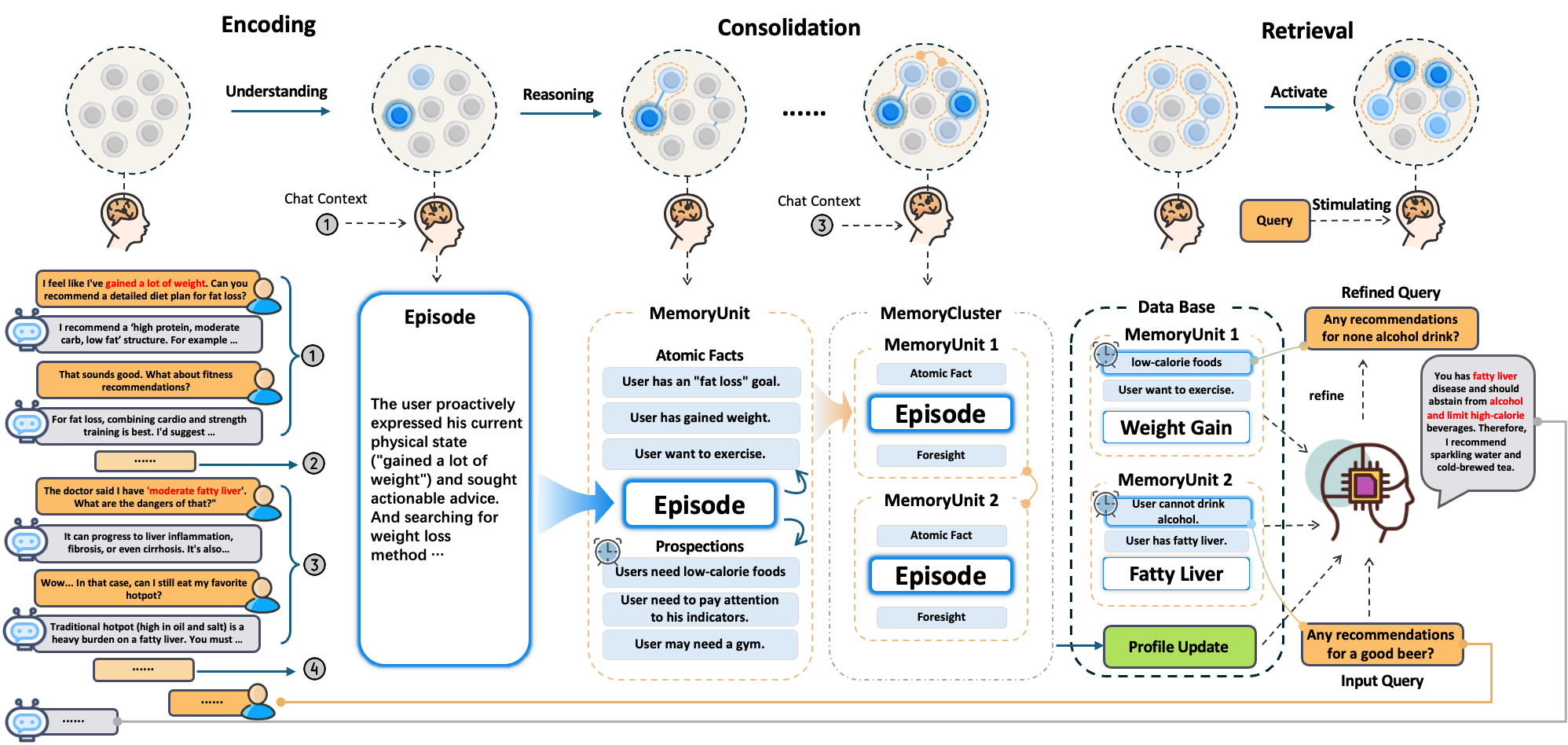 1. **Episodic Trace Formation**: EverOS monitors the continuous dialogue stream and uses semantic boundary detection to segment interactions into coherent events.
2. **Structured Encoding**: For each event, it synthesizes a **MemCell** containing a concise third-person **Episode**, atomic **Facts**, and time-bounded **Prospections**.
3. **Semantic Consolidation**: Instead of flat storage, MemCells are dynamically clustered into thematic **MemScenes** (e.g., "Health", "Work") to capture high-level contexts.
4. **Profile Evolution**: The system continuously distills these scenes to update a structured **User Profile**, separating stable traits from temporary states.
5. **Reconstructive Recollection**: Your agent retrieves context via hybrid search (BM25/vector/RRF) or **Agentic Retrieval**. EverOS navigates MemScenes, filters for time-valid evidence, and iterates until the retrieved context is "necessary and sufficient."
6. **Grounded Reasoning**: The agent uses the returned memories as grounded context to respond and plan—enabling long-horizon reasoning without replaying weeks or months of history in the prompt.
## Core Memory Operations
Extract memory from messages and interactions.
Precise memory filtering based on specific metadata fields.
Context-aware memory search according to keywords using hybrid retrieval (including BM25, vector search)
## Continue to
1. **Episodic Trace Formation**: EverOS monitors the continuous dialogue stream and uses semantic boundary detection to segment interactions into coherent events.
2. **Structured Encoding**: For each event, it synthesizes a **MemCell** containing a concise third-person **Episode**, atomic **Facts**, and time-bounded **Prospections**.
3. **Semantic Consolidation**: Instead of flat storage, MemCells are dynamically clustered into thematic **MemScenes** (e.g., "Health", "Work") to capture high-level contexts.
4. **Profile Evolution**: The system continuously distills these scenes to update a structured **User Profile**, separating stable traits from temporary states.
5. **Reconstructive Recollection**: Your agent retrieves context via hybrid search (BM25/vector/RRF) or **Agentic Retrieval**. EverOS navigates MemScenes, filters for time-valid evidence, and iterates until the retrieved context is "necessary and sufficient."
6. **Grounded Reasoning**: The agent uses the returned memories as grounded context to respond and plan—enabling long-horizon reasoning without replaying weeks or months of history in the prompt.
## Core Memory Operations
Extract memory from messages and interactions.
Precise memory filtering based on specific metadata fields.
Context-aware memory search according to keywords using hybrid retrieval (including BM25, vector search)
## Continue to