> ## Documentation Index
> Fetch the complete documentation index at: https://docs.evermind.ai/llms.txt
> Use this file to discover all available pages before exploring further.
# Personal AI Assistant
> Build a 1:1 AI assistant that remembers user preferences and context
Build an AI assistant that remembers user preferences, past conversations, and upcoming commitments. This guide shows you how to integrate EverOS into a personal assistant workflow.
## Architecture Overview
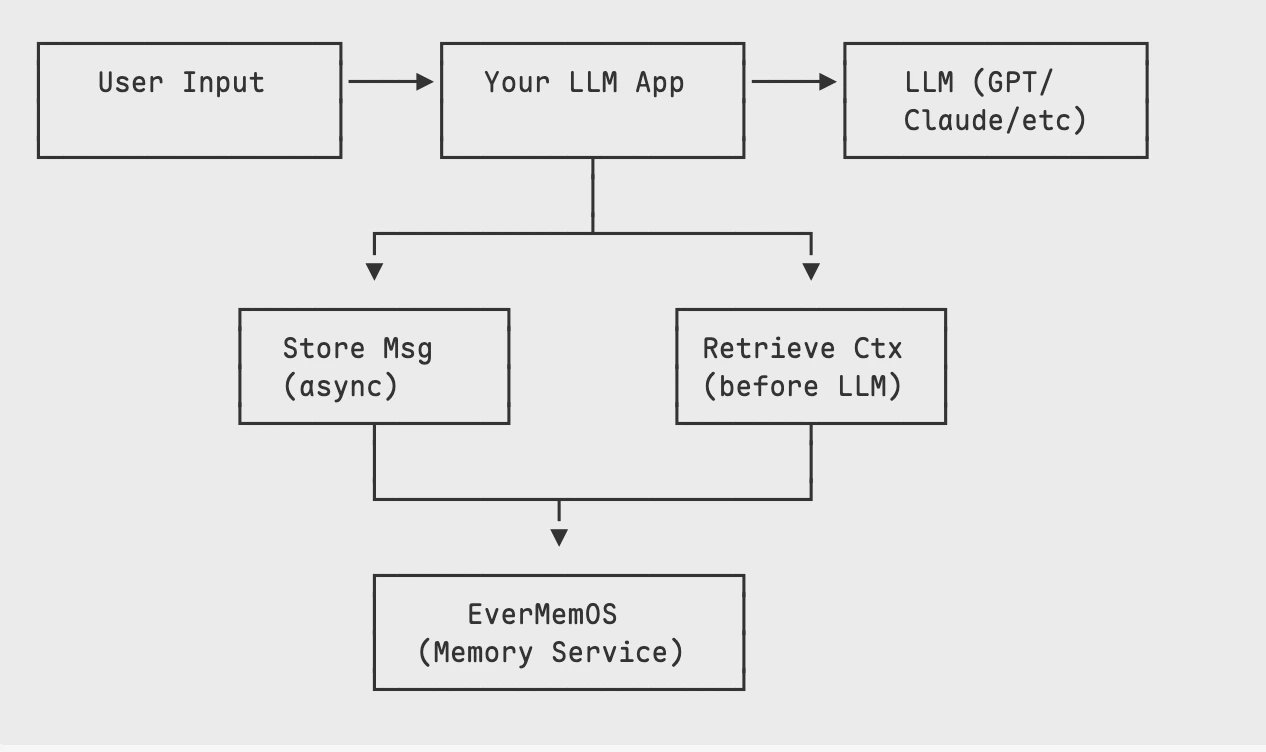 The assistant:
1. **Stores** every conversation turn in EverOS
2. **Retrieves** relevant context before generating responses
3. **Uses** the context to personalize LLM responses
## Setup: Install the SDK
Install the EverOS Python SDK and initialize the client. No scene or conversation-meta configuration is needed in v1 -- just start adding memories directly.
```bash theme={null}
pip install everos-cloud
```
```python theme={null}
from everos_cloud import EverOS
import time
client = EverOS()
memories = client.v1.memories
```
## Store Conversation Messages
Store each conversation turn asynchronously. EverOS processes them in the background.
```python theme={null}
def store_message(user_id: str, content: str, role: str = "user"):
"""Store a single message in EverOS."""
memories.add(
user_id=user_id,
messages=[
{
"role": role,
"timestamp": int(time.time() * 1000),
"content": content,
}
],
)
```
## Retrieve Relevant Context
Before generating a response, retrieve relevant memories to provide context to your LLM.
```python theme={null}
def get_memory_context(user_id: str, user_message: str) -> str:
"""Retrieve relevant memories for the current query."""
result = memories.search(
filters={"user_id": user_id},
query=user_message,
method="hybrid",
memory_types=["profile", "episodic_memory"],
top_k=5,
)
found = result.get("result", {}).get("memories", [])
if not found:
return ""
# Format memories for LLM context
context_parts = []
for mem in found:
mem_type = mem.get("memory_type", "unknown")
content = mem.get("memory_content", "")
if mem_type == "profile":
context_parts.append(f"[User Profile] {content}")
elif mem_type == "episodic_memory":
context_parts.append(f"[Past Conversation] {content}")
return "\n".join(context_parts)
```
## Complete Assistant Loop
Here's a complete implementation that ties everything together:
```python theme={null}
from everos_cloud import EverOS
import time
client = EverOS()
memories = client.v1.memories
class PersonalAssistant:
def __init__(self, user_id: str):
self.user_id = user_id
def _store_message(self, content: str, role: str = "user"):
"""Store a message in EverOS."""
memories.add(
user_id=self.user_id,
messages=[
{
"role": role,
"timestamp": int(time.time() * 1000),
"content": content,
}
],
)
def _get_context(self, query: str) -> str:
"""Retrieve relevant memory context."""
result = memories.search(
filters={"user_id": self.user_id},
query=query,
method="hybrid",
memory_types=["profile", "episodic_memory"],
top_k=5,
)
found = result.get("result", {}).get("memories", [])
if not found:
return "No relevant memories found."
parts = []
for mem in found:
mem_type = mem.get("memory_type", "").replace("_", " ").title()
content = mem.get("memory_content", "")
parts.append(f"[{mem_type}] {content}")
return "\n".join(parts)
def _generate_response(self, user_message: str, context: str) -> str:
"""Generate response using your LLM of choice."""
# Replace this with your actual LLM call (OpenAI, Anthropic, etc.)
prompt = f"""You are a helpful personal assistant. Use the following context about the user to personalize your response.
MEMORY CONTEXT:
{context}
USER MESSAGE:
{user_message}
Respond naturally, incorporating relevant context when appropriate. Don't explicitly mention that you're using memory unless asked."""
# Example: OpenAI call (replace with your LLM)
# response = openai.chat.completions.create(
# model="gpt-4",
# messages=[{"role": "user", "content": prompt}]
# )
# return response.choices[0].message.content
# Placeholder for demo
return f"[LLM would respond here with context: {context[:100]}...]"
def chat(self, user_message: str) -> str:
"""Main chat method - store, retrieve, generate, store."""
# 1. Store user message
self._store_message(user_message, role="user")
# 2. Retrieve relevant context
context = self._get_context(user_message)
# 3. Generate response with context
response = self._generate_response(user_message, context)
# 4. Store assistant response
self._store_message(response, role="assistant")
return response
# Usage
assistant = PersonalAssistant("user_alice")
# Simulate conversation
print(assistant.chat("I prefer meetings in the morning, before 10am."))
print(assistant.chat("What time works best for our call tomorrow?"))
# The second response will use memory of the preference!
```
## Example: Using Preferences
After a few conversations, your assistant can leverage stored preferences:
```python theme={null}
# Earlier conversation (already stored)
# User: "I'm vegetarian and allergic to nuts"
# User: "I love Italian food"
# Later conversation
user_message = "Can you suggest a restaurant for dinner?"
context = assistant._get_context(user_message)
# Context includes:
# [Profile] User is vegetarian
# [Profile] User has nut allergy
# [Profile] User enjoys Italian cuisine
# LLM generates: "How about that new Italian place downtown?
# They have great vegetarian options and I checked - they're
# nut-free friendly!"
```
## Best Practices
Limit retrieved memories to avoid overwhelming your LLM context window.
```python theme={null}
# Good: Limit to most relevant
top_k=5
# Better: Truncate if needed
context = context[:2000] # Limit to ~500 tokens
```
EverOS v1 supports multiple search methods. Pick the one that fits your use case.
```python theme={null}
# Semantic similarity -- best for intent matching
method="vector"
# Hybrid (keyword + vector) -- good general-purpose default
method="hybrid"
# Agentic -- lets the model decide what to retrieve
method="agentic"
```
Request only the memory types you need to keep results focused.
```python theme={null}
# User facts and preferences
memory_types=["profile"]
# Past conversation summaries
memory_types=["episodic_memory"]
# Both
memory_types=["profile", "episodic_memory"]
```
## Next Steps
Deep dive into vector, hybrid, and agentic retrieval
Production-ready async patterns and error handling
The assistant:
1. **Stores** every conversation turn in EverOS
2. **Retrieves** relevant context before generating responses
3. **Uses** the context to personalize LLM responses
## Setup: Install the SDK
Install the EverOS Python SDK and initialize the client. No scene or conversation-meta configuration is needed in v1 -- just start adding memories directly.
```bash theme={null}
pip install everos-cloud
```
```python theme={null}
from everos_cloud import EverOS
import time
client = EverOS()
memories = client.v1.memories
```
## Store Conversation Messages
Store each conversation turn asynchronously. EverOS processes them in the background.
```python theme={null}
def store_message(user_id: str, content: str, role: str = "user"):
"""Store a single message in EverOS."""
memories.add(
user_id=user_id,
messages=[
{
"role": role,
"timestamp": int(time.time() * 1000),
"content": content,
}
],
)
```
## Retrieve Relevant Context
Before generating a response, retrieve relevant memories to provide context to your LLM.
```python theme={null}
def get_memory_context(user_id: str, user_message: str) -> str:
"""Retrieve relevant memories for the current query."""
result = memories.search(
filters={"user_id": user_id},
query=user_message,
method="hybrid",
memory_types=["profile", "episodic_memory"],
top_k=5,
)
found = result.get("result", {}).get("memories", [])
if not found:
return ""
# Format memories for LLM context
context_parts = []
for mem in found:
mem_type = mem.get("memory_type", "unknown")
content = mem.get("memory_content", "")
if mem_type == "profile":
context_parts.append(f"[User Profile] {content}")
elif mem_type == "episodic_memory":
context_parts.append(f"[Past Conversation] {content}")
return "\n".join(context_parts)
```
## Complete Assistant Loop
Here's a complete implementation that ties everything together:
```python theme={null}
from everos_cloud import EverOS
import time
client = EverOS()
memories = client.v1.memories
class PersonalAssistant:
def __init__(self, user_id: str):
self.user_id = user_id
def _store_message(self, content: str, role: str = "user"):
"""Store a message in EverOS."""
memories.add(
user_id=self.user_id,
messages=[
{
"role": role,
"timestamp": int(time.time() * 1000),
"content": content,
}
],
)
def _get_context(self, query: str) -> str:
"""Retrieve relevant memory context."""
result = memories.search(
filters={"user_id": self.user_id},
query=query,
method="hybrid",
memory_types=["profile", "episodic_memory"],
top_k=5,
)
found = result.get("result", {}).get("memories", [])
if not found:
return "No relevant memories found."
parts = []
for mem in found:
mem_type = mem.get("memory_type", "").replace("_", " ").title()
content = mem.get("memory_content", "")
parts.append(f"[{mem_type}] {content}")
return "\n".join(parts)
def _generate_response(self, user_message: str, context: str) -> str:
"""Generate response using your LLM of choice."""
# Replace this with your actual LLM call (OpenAI, Anthropic, etc.)
prompt = f"""You are a helpful personal assistant. Use the following context about the user to personalize your response.
MEMORY CONTEXT:
{context}
USER MESSAGE:
{user_message}
Respond naturally, incorporating relevant context when appropriate. Don't explicitly mention that you're using memory unless asked."""
# Example: OpenAI call (replace with your LLM)
# response = openai.chat.completions.create(
# model="gpt-4",
# messages=[{"role": "user", "content": prompt}]
# )
# return response.choices[0].message.content
# Placeholder for demo
return f"[LLM would respond here with context: {context[:100]}...]"
def chat(self, user_message: str) -> str:
"""Main chat method - store, retrieve, generate, store."""
# 1. Store user message
self._store_message(user_message, role="user")
# 2. Retrieve relevant context
context = self._get_context(user_message)
# 3. Generate response with context
response = self._generate_response(user_message, context)
# 4. Store assistant response
self._store_message(response, role="assistant")
return response
# Usage
assistant = PersonalAssistant("user_alice")
# Simulate conversation
print(assistant.chat("I prefer meetings in the morning, before 10am."))
print(assistant.chat("What time works best for our call tomorrow?"))
# The second response will use memory of the preference!
```
## Example: Using Preferences
After a few conversations, your assistant can leverage stored preferences:
```python theme={null}
# Earlier conversation (already stored)
# User: "I'm vegetarian and allergic to nuts"
# User: "I love Italian food"
# Later conversation
user_message = "Can you suggest a restaurant for dinner?"
context = assistant._get_context(user_message)
# Context includes:
# [Profile] User is vegetarian
# [Profile] User has nut allergy
# [Profile] User enjoys Italian cuisine
# LLM generates: "How about that new Italian place downtown?
# They have great vegetarian options and I checked - they're
# nut-free friendly!"
```
## Best Practices
Limit retrieved memories to avoid overwhelming your LLM context window.
```python theme={null}
# Good: Limit to most relevant
top_k=5
# Better: Truncate if needed
context = context[:2000] # Limit to ~500 tokens
```
EverOS v1 supports multiple search methods. Pick the one that fits your use case.
```python theme={null}
# Semantic similarity -- best for intent matching
method="vector"
# Hybrid (keyword + vector) -- good general-purpose default
method="hybrid"
# Agentic -- lets the model decide what to retrieve
method="agentic"
```
Request only the memory types you need to keep results focused.
```python theme={null}
# User facts and preferences
memory_types=["profile"]
# Past conversation summaries
memory_types=["episodic_memory"]
# Both
memory_types=["profile", "episodic_memory"]
```
## Next Steps
Deep dive into vector, hybrid, and agentic retrieval
Production-ready async patterns and error handling